Send Your First Email with an Email MCP Server: A Real Run
What you will see
By the end you will have an email in your own inbox, sent through an email MCP server, and you will know what it cost, what it can not do on a free account, and what it looks like when something is missing. I run AISend, an email API that sends through Amazon SES, so this uses our product; the steps are the same shape for any email MCP server.
- Time: in my run on 2026-11-20 a new account went from sign-up (11:05) to a sent test email (11:07:02), including creating an API key by hand. In a separate timing check the same day, one email went from created to
deliveredin 2.4 seconds (one sample). - Cost and limits: free, no card, no DNS. A free account gets 10 test emails in total, at most 5 a day, from the shared sender
onboarding@send.aisend.app(noreply@send.aisend.appis accepted too), to your own confirmed address only. - Not free: sending to anyone else, or from your own domain, needs a paid plan (Pro is listed at $14 a month for up to 50,000 emails). Adding and verifying one domain works on a free account.
- What I did not do: no assistant sent the email. I tried to run the prompt through
claude -p, but the Claude login had expired, so the next section lists exactly what was run instead.
How this was tested
Run on production on 2026-11-20 (11:05 to 11:08 Vietnam time) with a throwaway account.
- What ran: MCP over HTTP against
https://api.aisend.app/mcpwith an API key: the same JSON-RPC requests an assistant sends (initialize,tools/list, thentools/callforget_account_status,send_email,add_domainandverify_domain), sent by a script. Claude Code 2.1.322 also connected to that URL with the same key:claude mcp listshowed✔ Connected. A later script call polledget_email_statusfor the timing check. - What did not run: Claude's own chat deciding to call the tools, so there is no Claude screenshot in this post. My
claude -pattempt stopped at "Failed to authenticate: OAuth session expired" before any tool call. Also not tested: the OAuth sign-in, claude.ai, Claude Desktop, Cursor, publishing the DNS records, a verified domain of my own, and any paid sending. - Masking: the screenshots are from the real dashboard. In them my sign-in address was swapped for
you@example.comin the page before capture, and the key prefix was covered withre_xxxxx...on the image afterwards. Tool outputs below are trimmed, with the address replaced the same way. - Clean-up: the test domain was deleted from the account after the run.
Before you start
- A free AISend account at aisend.app/signup. You must click the confirmation link in the email AISend sends; until then nothing can be sent.
- An MCP client. The commands below are for Claude Code; the MCP page and the package README also cover Cursor and Claude Desktop.
- Node.js 18 or newer only if you use the local
npxserver instead of the hosted one. - For steps 7 and 8 only: a domain you own and access to its DNS.
Step 1: sign up and confirm your email
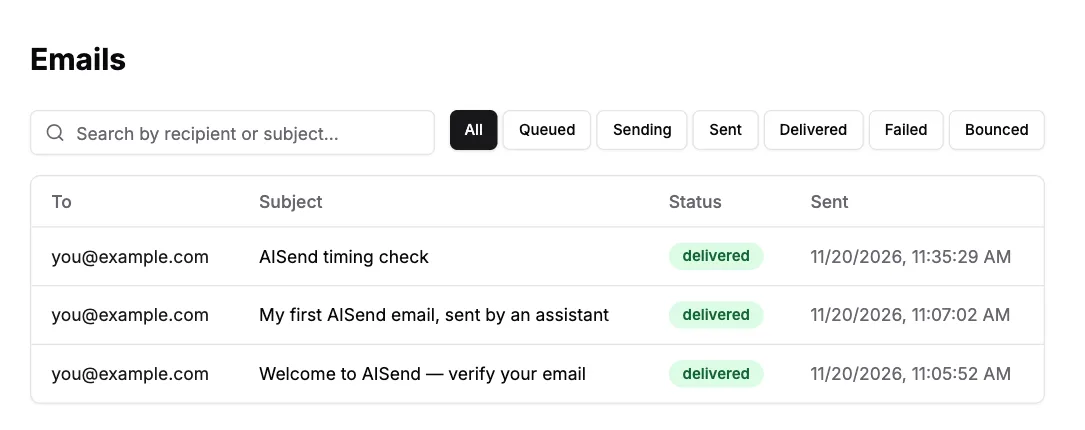
Create the account and open the confirmation email. In my run the mail "Welcome to AISend — verify your email" was delivered at 11:05:52, under a minute after sign-up, and it appears in the Emails list of the new account like any other message. Click its link, then sign in.
Step 2: connect AISend to Claude Code
There are two ways to authorise the hosted server. The first signs you in through the browser and needs no key in a file: run claude mcp add --transport http aisend https://api.aisend.app/mcp, then /mcp inside Claude Code and choose aisend. I did not complete that sign-in in this run.
The second uses an API key. Create one on the API Keys page (the key list afterwards shows only a prefix), then add the server with the key as a header. This is the variant I ran:
claude mcp add --transport http aisend https://api.aisend.app/mcp \
  --header "Authorization: Bearer re_your_api_key"
claude mcp list
# aisend: https://api.aisend.app/mcp (HTTP) - ✔ Connected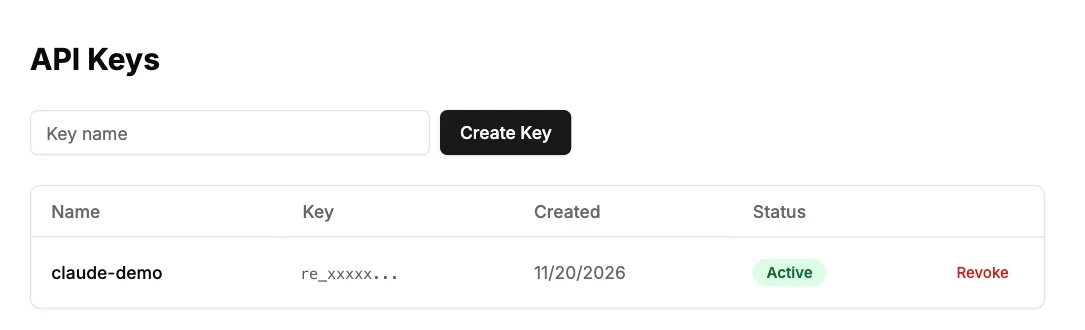
Step 3: what the assistant gets when it connects
The initialize call returned server aisend version 0.3.1 on MCP protocol 2025-06-18, with instructions that tell the model the free-tier rules and the order for real sending. tools/list returned ten tools on the hosted server: send_email, get_email_status, list_emails, validate_email, list_api_keys, list_domains, get_account_status, add_domain, verify_domain and get_app_links. If you prefer a local server, claude mcp add aisend -e AISEND_API_KEY=re_your_api_key -- npx -y aisend-mcp starts the npm package instead; I did not run that variant in this test.
Step 4: ask for a test email
Ask Claude: Check my AISend account, then send me a test email. A well-behaved assistant starts with the read-only get_account_status. This is what my run returned (trimmed, address replaced):
{
  "state": "unpaid",
  "plan": "free",
  "canSendToOthers": false,
  "emailVerified": true,
  "sandbox": {
    "available": true,
    "sender": "onboarding@send.aisend.app",
    "to": "you@example.com",
    "lifetimeLimit": 10, "used": 0, "remaining": 10,
    "dailyLimit": 5, "usedToday": 0, "remainingToday": 5
  },
  "domains": { "limit": 1, "used": 0 },
  "nextStep": { "code": "send_sandbox_test" }
}
Step 5: the send, and proof it arrived
Next comes send_email. idempotency_key is required: sending the same key twice returns the first result instead of a second email. These are the arguments my script sent in the run (an assistant would send the same), and the full result:
// tools/call send_email
{
  "from": "onboarding@send.aisend.app",
  "to": "you@example.com",
  "subject": "My first AISend email, sent by an assistant",
  "text": "If you read this, the sandbox send worked end to end.",
  "idempotency_key": "demo-first-send-1"
}

// result
{ "id": "83f8a2d0-3d1f-4901-b76e-51b543491359" }
Step 6: check the status
The send returns only an id, so a client follows up with get_email_status, or you look at the Emails page. The first send was at 11:07:02. For a measured number I ran a second sandbox send later that day and polled get_email_status: the record went sending (created 04:35:29.195 UTC), sent and delivered (updated 04:35:31.592 UTC), so 2.4 seconds from created to delivered. That is one sample, not a benchmark. "Delivered" means the receiving mail server accepted it; it does not say the message avoided spam, so look in your inbox. The Emails page lists the three messages from this run: the confirmation mail, the first test email and the timing check.
Step 7: your own domain, on a subdomain
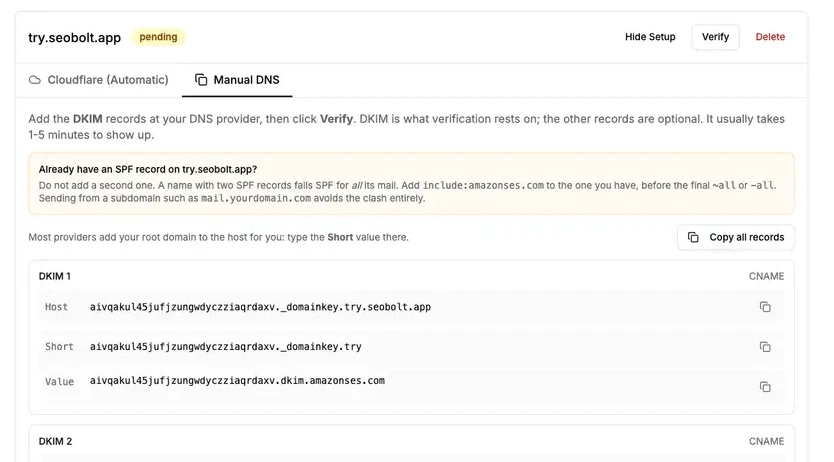
Ask: Add try.example.com to my AISend account and show me the DNS records exactly as returned. Use a subdomain you own, not the root domain: it leaves the root domain's existing email and SPF record untouched and keeps sending reputation separate. In my run add_domain was called with { "domain": "try.seobolt.app" }, a subdomain of a domain I control, and returned the status pending plus five records, which the dashboard shows too:
| Type | Host (shape) | Value (shape) | Required |
|---|---|---|---|
| CNAME | <token1>._domainkey.try.seobolt.app | <token1>.dkim.amazonses.com | yes |
| CNAME | <token2>._domainkey.try.seobolt.app | <token2>.dkim.amazonses.com | yes |
| CNAME | <token3>._domainkey.try.seobolt.app | <token3>.dkim.amazonses.com | yes |
| TXT | try.seobolt.app | v=spf1 include:amazonses.com ~all | no |
| TXT | _dmarc.try.seobolt.app | v=DMARC1; p=none; rua=mailto:dmarc@try.seobolt.app | no |
Step 8: verify, and what it says when the records are missing
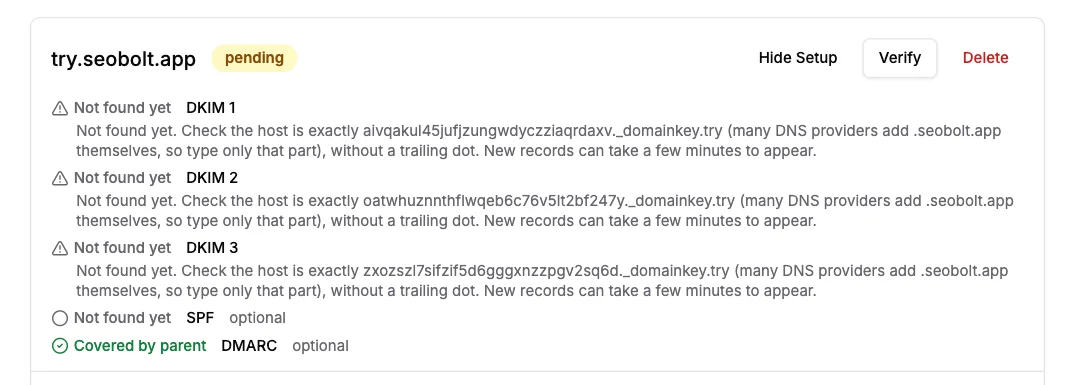
I did not publish the records, so this part shows the failure path, which is the one you will actually need. verify_domain (it takes the domain id from add_domain) returned verified: false with the checks spf: false, dkim: false, dmarc: true, and one entry per record:
| Record | Required | State in my run | Hint returned |
|---|---|---|---|
| DKIM 1, 2, 3 | yes | missing | "Not found yet. Check the host is exactly <token>._domainkey.try (many DNS providers add .seobolt.app themselves, so type only that part), without a trailing dot. New records can take a few minutes to appear." |
| SPF | no | missing | "No SPF record yet. Optional: verification does not depend on it." |
| DMARC | no | inherited | "Already covered by the DMARC policy on seobolt.app. Nothing to add." |
Why only DKIM matters, and what else a record can say
DKIM is what verification rests on; SPF and DMARC are optional. If the name already has an SPF record, merge include:amazonses.com into it instead of adding a second one, because two SPF records break SPF. Other states the tool can return are wrong_value, proxied (Cloudflare proxy on a DKIM CNAME), doubled_host (the zone typed twice), duplicate, merge_needed and unknown. For the decision table behind them, see why domain verification fails. DNS can take minutes to hours to show up, so I can not tell you from this run how long a successful verification takes.
What is free and what is not
| Feature | Free account | Pro (paid) |
|---|---|---|
| Test emails | 10 in total, 5 a day | Sending plan: up to 50,000 emails a month |
| Recipients | Your own confirmed address only | Anyone |
| Sender | onboarding@send.aisend.app or noreply@send.aisend.app (AISend's shared sender) | An address on your verified domain |
| Domains | Add and verify 1 | Verified domain required to send |
| Price | $0, no card | $14 a month, as listed on the pricing page |
If something goes wrong
The first column says where I saw the message. "Run" means it appeared in my run on 2026-11-20; "re-run" means I reproduced it again on 2026-11-20 with no key, and the output is saved with the evidence; "not triggered" means it comes from the documented behaviour and I did not provoke it.
| Message or symptom | Seen | What to do |
|---|---|---|
verified: false, DKIM missing | Run | Publish the three DKIM CNAMEs exactly as returned, DNS-only, then run verify again. |
! Needs authentication in Claude Code | Re-run 2026-11-20 | You added the hosted server without a key: run /mcp and sign in, or add the Authorization header. |
HTTP 401 with a WWW-Authenticate header from /mcp | Re-run 2026-11-20 | The key is missing or wrong. Create a new key on the API Keys page. |
We can't find DNS for ... (code domain_not_found) | Not triggered | The registrable domain does not exist in DNS. Fix the spelling or register it. |
HTTP 402 paid_plan_required | Not triggered | The send was not sandbox-shaped (another recipient or sender). A free account can send only to itself from AISend's shared sender (onboarding@send.aisend.app or noreply@send.aisend.app). |
free_allowance_used | Not triggered | All 10 test emails are used. A paid plan is the way forward. |
| HTTP 429 "Daily sending limit reached" | Not triggered | The sixth sandbox send in a UTC day. Try again tomorrow. |
Disclosure
We build and sell AISend, so this is not a neutral comparison. Sending to anyone but yourself requires a paid plan. This post was drafted with AI assistance. The commands, tool outputs and timings above were copied from the logs of the 2026-11-20 run; the claude mcp list line and the failed claude -p attempt are kept in our own evidence folder and are not published.
Frequently asked questions
Did Claude itself send the email?
No. A script sent the same JSON-RPC requests an assistant client sends, over HTTP, using an API key, and Claude Code connected to the same server with the same key. My attempt to run the prompt through claude -p failed on an expired Claude login, so Claude's chat deciding to call the tools was not tested.
Can I send the test email to a colleague?
No. The sandbox accepts exactly one recipient, your own confirmed account address. Anything else needs a paid plan.
Do I need DNS for my first email?
No. The sandbox senders onboarding@send.aisend.app and noreply@send.aisend.app are on AISend's own shared domain, so there is nothing to publish.
Do I need SPF and DMARC to verify a subdomain?
No. The three DKIM CNAME records gate verification. SPF and DMARC are optional.
Is the hosted server the same as the npm one?
The hosted server offers the same tools except create_api_key and agent_signup. With OAuth, the key it issues expires after 90 days and can be revoked on the API Keys page.
Related Posts
Ready to Send Smarter Emails?
Sending to your recipients needs a paid plan; a free account can send 10 test emails to its own verified address.